
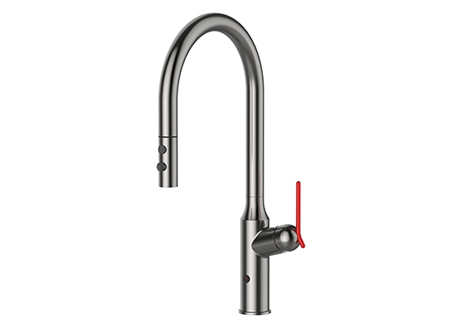
A sensor faucet, also called a Touchless kitchen faucet, is designed to turn water on and off automatically when it detects your hands or an object in front of the sensor. When it stops working, the cause is usually simple: power issues, sensor obstruction, incorrect detection range, a closed valve, low water pressure, or a blocked aerator. The key is to troubleshoot in a safe order so you do not replace parts that are not broken.
This guide explains the most common reasons a sensor faucet stops responding and how to fix each issue. If you are comparing options for new installations or replacements, you can view HAOJIAJIA models in our touchless kitchen faucet range.
Most sensor faucets have three core systems working together. The sensor detects movement or reflected infrared signals. The control unit interprets the signal and sends power to a solenoid valve. The solenoid opens to allow water to flow and closes when detection stops or the faucet times out. If any of these systems lose power, lose signal, or face a water supply restriction, the faucet may not respond correctly.
Because the faucet depends on both electricity and water flow, troubleshooting should check basic supply conditions first, then move to sensor and control components.
If the faucet does not respond at all, power is the first thing to verify. Battery-powered models often fail quietly when battery voltage drops below the level needed to actuate the solenoid. Some faucets show weak or inconsistent response before fully stopping.
Signs of a power issue include no response to motion, delayed activation, or water turning on briefly then shutting off. Replace batteries with new ones and ensure correct polarity. If the faucet uses an adapter, confirm the adapter is firmly connected and that the outlet is working.
Also check the battery compartment for moisture, corrosion, or loose contacts. A small amount of oxidation can interrupt power delivery, especially under a sink where humidity is common.
If the sensor appears to work but water does not flow, the water supply may be restricted. Start with the shutoff valves under the sink. Make sure both hot and cold valves are fully open. Partially open valves can create low flow that feels like a sensor failure.
Next check if the supply hoses are kinked, pinched, or twisted. Installation work under a sink can accidentally compress flexible lines. If the faucet recently stopped working after cabinet cleaning or plumbing work, this is a common cause.
In homes with hard water or older pipes, debris can clog filters and aerators. Many touchless faucets include inlet screens that protect the solenoid valve from particles. If those screens clog, the solenoid may open but water flow remains weak or stops completely.
Touchless faucets rely on accurate detection. The sensor can be blocked by a layer of grease, water spots, or cleaning residue. It can also be confused by reflective surfaces like stainless steel sinks, glossy backsplashes, or shiny cookware left in the detection zone.
A practical first step is cleaning the sensor lens gently with a soft cloth and mild cleaner, then drying it fully. Avoid abrasive pads because they can scratch the lens and reduce detection accuracy.
If your faucet activates by itself, it is often caused by reflection changes. A bright window, under-cabinet lighting, or moving reflective objects can trigger the sensor. Adjusting the sensor range or repositioning nearby reflective items usually solves the issue.
Many touchless faucets allow sensor range adjustment. If the range is too short, your hand may not be detected unless it is extremely close. If it is too long, normal movement near the sink can trigger the faucet unexpectedly.
Range issues show up as:
Faucet only works when hands are very close to the spout
Faucet triggers when you walk past the sink
Faucet turns on when a pan or bowl is left in the basin
If your faucet supports range setting, reset it to a medium default and test again. The best range is one that activates with a natural hand motion while avoiding false triggers from the surrounding environment.
If the faucet turns on but the flow is weak, uneven, or spraying sideways, the aerator may be clogged. Mineral scale and debris are common in kitchens, especially when water quality is hard. A blocked aerator can make it seem like the sensor is malfunctioning because the faucet “works” but output is not usable.
Remove the aerator and rinse it. If scale is heavy, soak it briefly in a descaling solution, then brush gently and rinse. For pull-down or pull-out spray heads, check the outlet screen and spray face for mineral buildup as well.
This is one of the fastest fixes and it often restores normal performance immediately.
The solenoid valve is the part that physically opens and closes the water path. If the solenoid is clogged with debris, it may click but not open fully. If it is stuck, the faucet may not flow at all or may drip continuously.
Many touchless faucets include filter screens before the solenoid. When these screens clog, water cannot reach the valve properly. Cleaning the screens and flushing the line can solve the issue without replacing components.
Solenoid-related symptoms often include:
A clicking sound but no water flow
Water turns on then shuts off quickly
Faucet keeps dripping after shutoff
If cleaning screens and aerator does not help, the solenoid may need service or replacement.
Sensor faucets may behave inconsistently when water pressure is very low. If hot and cold pressure are imbalanced, some systems also respond poorly. This can happen in buildings with shared plumbing, older pressure regulators, or partially blocked supply lines.
Signs of low pressure include slow flow in multiple fixtures, delayed activation, and unstable temperature mixing. Testing another faucet in the same kitchen helps confirm whether the issue is local to the sensor faucet or related to the whole water supply.
If low pressure is the cause, solving it may require adjusting valves, cleaning supply screens, or checking the home’s pressure regulator.
| What You See | Most Likely Cause | What to Do First |
|---|---|---|
| No response at all | Dead batteries or power connection issue | Replace batteries or check adapter |
| Sensor responds but no water | Shutoff valve closed or clogged screen | Open valves, clean inlet screens |
| Random activation | Reflection or range too long | Clean lens, adjust range, remove reflective triggers |
| Weak flow but activates | Clogged aerator or spray head | Clean aerator and spray outlet |
| Turns on then off quickly | Low battery or clogged solenoid screen | Replace batteries, clean screens |
| Dripping after shutoff | Debris in solenoid or valve issue | Clean screens, flush line, inspect valve |
Most failures are preventable with simple habits. Keep the sensor lens clean, avoid spraying harsh chemicals directly onto the sensor area, and dry the faucet after heavy cleaning to reduce residue buildup. If your area has hard water, regular aerator cleaning prevents flow restriction. After plumbing work, flush the lines briefly to remove debris before it reaches the solenoid system.
For stable long-term performance, choosing a well-built touchless faucet with consistent manufacturing and reliable internal components reduces troubleshooting frequency. You can explore HAOJIAJIA models in the touchless kitchen faucet range.
A sensor faucet usually stops working because of power loss, sensor obstruction, incorrect range, closed valves, low pressure, or blockage in the aerator and filter screens. Troubleshooting in the right order saves time and avoids unnecessary part replacement. Start by confirming power and water supply, then clean the sensor lens and aerator, and finally inspect inlet screens and the solenoid valve if needed.
If you are planning a replacement or a new project installation, a stable touchless design with reliable detection and easy-maintenance components can reduce future downtime. Explore options in the touchless kitchen faucet range.

 Mobile Phone:
 Phone:
 Contact Now